Top level
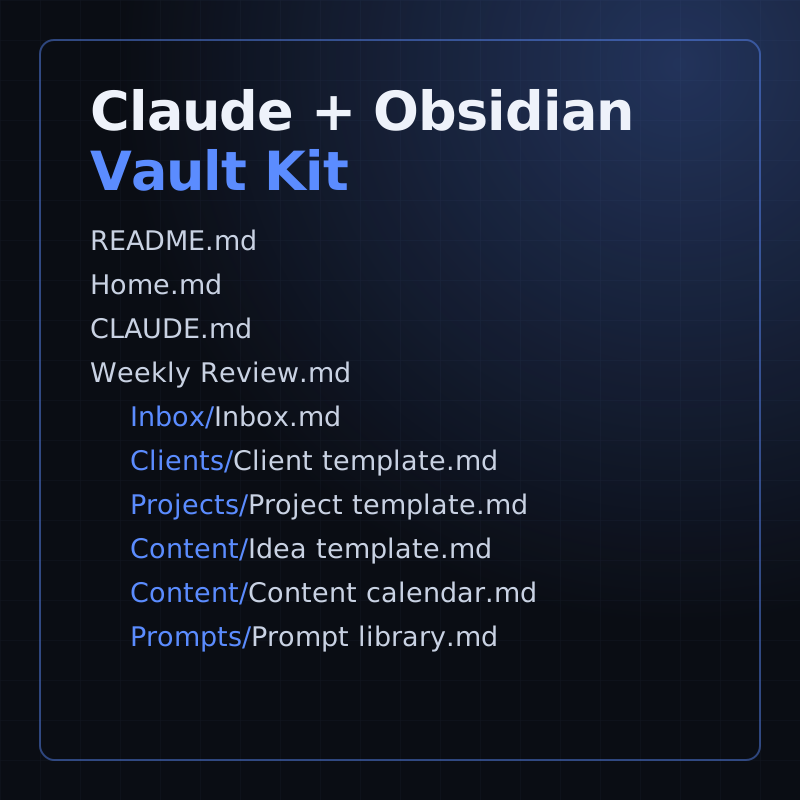
- README.md: five-minute setup and how the templates work
- Home.md: start page linking every part of the vault
- CLAUDE.md: rules for Claude inside the vault
- Weekly Review.md: the weekly review template
Kit
A starter Obsidian vault for running a small business with Claude: templates, a weekly review and 16 prompts.
Free lesson on this topic: Build a Custom Claude Connector: a Remote MCP Server with OAuth (Beginner Guide) (opens YouTube)
Claude + Obsidian Vault Kit
$19 one-time
After Stripe checkout you land on your own access page with every file. Each download link works for 7 days; open the page again for fresh links. Lost it? Recover it with your Stripe receipt.
This title: $19, paid once. No subscription.
Nothing else from ATLAS Academy: no subscription, no renewal, no add-ons. If a tool under You need has paid plans, that company sets the price.
Checkout ends on your own access page with every file. Each download link works for 7 days; open the access page again for fresh ones.
Lost the page? Recover it with the email your Stripe receipt went to and the receipt number on it.
Sneak peek
Cut from the files you get after checkout. Nothing here is a mock-up.
Every file in the zip, 10 in all.
# Claude + Obsidian Vault Kit

A starter Obsidian vault for running a small business with Claude. It is a folder of plain Markdown notes: a home page, templates for clients, projects and content, a weekly review, a prompt library, and a `CLAUDE.md` file that tells Claude how to work in the vault.

Nothing here needs a plugin or an account with us. Your notes stay in this folder on your computer and open in Obsidian without an internet connection. Claude needs internet and your own Claude account.

## Setup (about five minutes)

1. **Install Obsidian.** Download it from https://obsidian.md and install it.
2. **Unzip this kit** somewhere you keep documents, for example your Documents folder. You get a folder called `Vault Kit`. Rename it if you like, for example to your business name.
3. **Open the folder as a vault.** In Obsidian, choose **Open folder as vault** and pick the folder. Open [[Home]].Contents
Counted from the files on 1 Oct 2026.
| Format | Zip of plain Markdown notes |
|---|---|
| Notes | 10: 4 at the top level, 6 across 5 folders |
| Prompts | 16 |
| Plugins | None needed |
| You need | Obsidian, and your own Claude access |
How it works
Buy opens Stripe's secure checkout. We never see your card details.
You land on it right after checkout, with every file.
First up: README.md: five-minute setup and how the templates work (Top level).
Each download link works for 7 days. Open the page again for fresh links.
What you will finish
An Obsidian vault for your business: a note per client and per project, a dated weekly review, a prompt library, and a CLAUDE.md that tells Claude to keep your client's own words, leave a missing figure blank and draft messages rather than send them.
The kit's real Client template (who they are, the problem in their words, agreed work, a conversation log) and its Weekly Review (inbox, clients, projects, money "only numbers you can check", content, decisions, three priorities). The kit ships templates, not a filled-in example client.
A folder of plain Markdown notes: templates, a weekly review, a prompt library, and a CLAUDE.md that tells Claude how to behave inside the vault. It needs no plugins and no extra software beyond Obsidian and Claude.
Every file the purchase delivers, as listed on your access page.
Claude + Obsidian Vault Kit (zip)
Beyond the free material
Exactly what you get
Human review is the method
Everything in Inbox/ needs sorting.
Claude proposes where each item belongs, an existing client or project note, a new content idea, or delete, with a one-line reason each.
Claude shows the full plan as a list and waits for your yes before moving, creating or deleting anything.
Claude makes the moves you agreed to.
Nothing moves.
What this control doesn't do. CLAUDE.md is an instruction Claude is asked to follow, not a lock. Read the plan before you say yes, and keep a copy of the vault.
Tested with
All 17 links between the notes open a note inside the kit.
An automated check of the kit's zip in Miro's vault
Curriculum
Each lesson, note or file, in the order you'll meet it.
Thirty lessons on shaping the offer your vault's client and project notes will track.
Something else? Write to Miro.
No. You need Obsidian (from obsidian.md) and your own Claude access.
Run Claude Code in the unzipped folder (it reads CLAUDE.md automatically), or attach the notes and CLAUDE.md to a chat or Project in the Claude app.
14-day money-back guarantee: if it isn't useful, email us within 14 days of purchase for a full refund, no questions asked. Refund policy
One purchase covers one household: everyone who lives in the buyer's home may use the guides and printables. Please don't resell or share them publicly. The buyer must be an adult. We never ask for a child's name, age or email.
Help
Miro replies by email within 2 business days.