Go deeper
An agent you build and run yourself, which picks from a closed list of actions and asks before it acts. Needs some Python.
Course
Build an AI agent for your business that picks actions from a closed list you define, waits for your approval on anything you haven't cleared to run alone, and refuses five kinds of action in code: moving money, DNS, deleting, revoking keys and changing itself.
- Level
- Builder: Python
- Format
- Video lessons, PDF, Files (zip)
- You need
- Some Python, or the patience to learn it with Claude beside you
Next lesson
Coming next: giving Hermes Agent real tools with MCP
All lessons in Local AI: Hermes Agent on NVIDIA DGX Spark
Lesson script
The lesson's script, line by line. The published video's own lines are not on record here, so the video may differ in places.
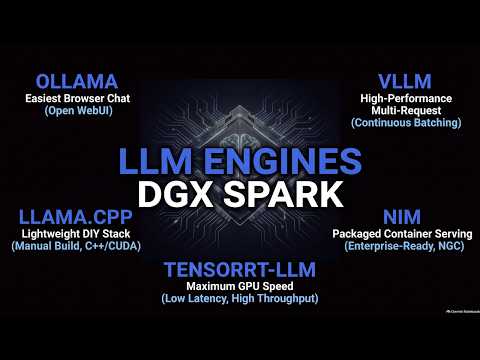
First, what they share. Each one loads a model onto your Spark, and answers requests to it.
Four of the five offer an OpenAI style API, so apps and agents can talk to them the same way.
And NVIDIA has a playbook for each, on build.nvidia.com, slash spark. That's our only source today.
Ollama comes in NVIDIA's Open WebUI playbook. You chat in a browser, from your laptop or on the Spark itself.
You download and run models right from that web page. Ollama handles the model management.
It's one container with both inside. The gentlest start of the five.
llama.cpp is a lightweight stack, written in C and C plus plus, with no separate Python framework.
The catch? You build it yourself, with CUDA, using git and CMake.
It loads models in the GGUF format, and llama server gives you that OpenAI style API.
Quick quiz. You want to chat with a local model in a browser, and build nothing. Which one? Comment your answer.
B. Ollama with Open WebUI. Models and chat, all in the web page.
vLLM is built for serving. NVIDIA calls it a highly performant inference engine.
It uses continuous batching to handle lots of requests, which matters once apps and agents share one model.
And it's the one NVIDIA's Hermes Agent playbook uses. That's what we set up last time.
If you're building a local AI setup, subscribe for the rest of the series.
NIM is NVIDIA's packaged option: ready-made containers for serving a model.
You sign in to NVIDIA's registry first, with an NGC account and its key. Keep that key private.
Then you launch the container, and check its OpenAI compatible endpoint.
TensorRT LLM is an open source library from NVIDIA, for optimising and speeding up models on its GPUs.
NVIDIA aims it at lower latency and higher throughput.
But the playbook expects Python and PyTorch experience. It's the most hands-on of the five.
Pause the video and open NVIDIA's Spark playbooks page.
Pick the one that fits your job, and read its prerequisites. Resume when you know what it needs.
So, how to pick? To chat in a browser, start with Ollama and Open WebUI.
For agents and apps calling one model, vLLM, or NIM if you'd like NVIDIA's ready-made containers.
And to squeeze out more, with Python skills to match, TensorRT LLM. llama.cpp fits when you like to build things yourself.
Will your favourite model fit? Don't guess. Each playbook names the models it was tested with.
And it says what they need. llama.cpp's, for example, asks for about thirty gigabytes free for its example model.
If a model isn't in a recipe, treat it as untested.
Last quiz. Your agent and two apps all call the same local model. Which fits best? Comment.
B, vLLM. It's built to serve many requests at once.
Recap. Ollama with Open WebUI is the easy way to chat in a browser.
llama.cpp is light, if you're happy to build it.
vLLM, or NVIDIA's NIM, serve apps and agents through one API.
And TensorRT LLM is for tuning, if you know Python well. Pick by the job, and follow the playbook. Next time: giving Hermes Agent real tools with MCP.