Practice check
Free lab file, no sign-up:
Go deeper
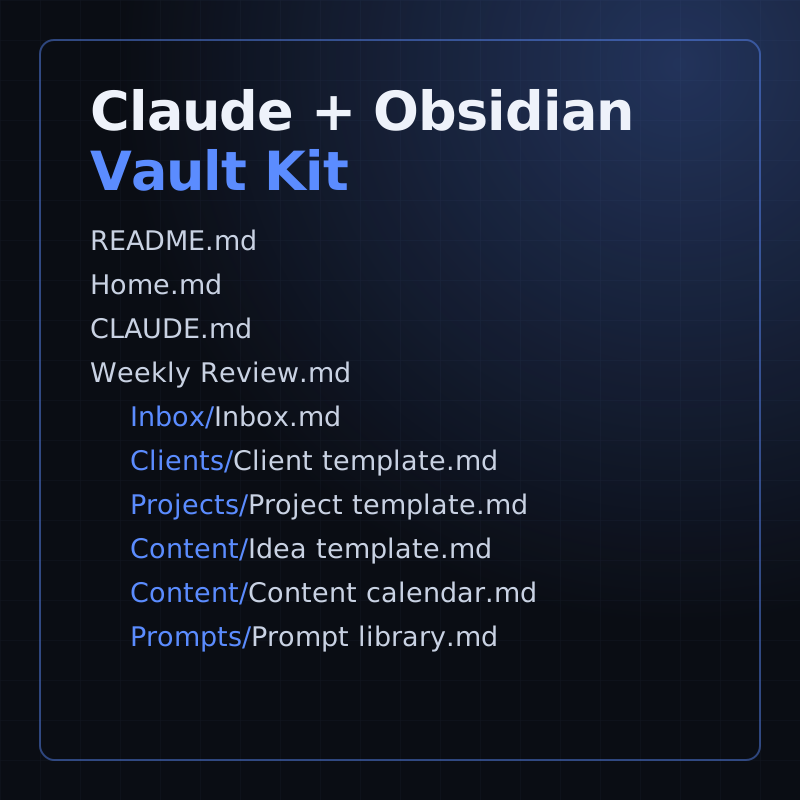
Put Claude to work on your own business notes: a starter vault with templates, a weekly review and prompts.
Kit
A starter Obsidian vault for running a small business with Claude: templates, a weekly review and 16 prompts.
- Level
- Beginner, no code
- Format
- Files (zip)
- You need
- Obsidian, and your own Claude access
Next lesson
Best MCP Servers for Claude Code (2026) + How to Fix "MCP Not Working"
All lessons in Claude Mastery: MCP, Skills & Connectors
Lesson script
The lesson's script, line by line. The published video's own lines are not on record here, so the video may differ in places.
MCP stands for Model Context Protocol. The official site calls it an open-source standard for connecting AI applications to external systems.
The docs compare it to USB-C: one standard plug, so things just connect. Goodbye, drawer of cables.
Build a server once, and any app that speaks MCP, like Claude or Claude Code, can use it. That's the whole idea: build once, plug in anywhere.
Here's a complete server in Python, with the official SDK. Set up with uv: uv init hello, then uv add, mcp with the cli extra.
The mcp.tool decorator turns a normal function into a tool. Its type hints and docstring tell Claude what it does.
At the bottom it runs over stdio, with no print anywhere. On purpose.
The host is the AI app you use, like Claude for Desktop or Claude Code.
Inside it, there's one client per server. The host handles that part for you, so you never write a client yourself.
And the server is your program. It offers something useful, and it's the part you build. One host can talk to many servers at once, each through its own client.
Quick quiz. Which of the three do you build yourself? Comment your answer.
C, the server. The host and its clients come with the app.
A server can offer three things. Tools are functions the AI can call, and you approve each use.
Resources are file-like data the app can read, like a file's contents.
And prompts are ready-made templates for common tasks. Ours offers one tool.
A local server runs on your computer and talks over standard input and output, called stdio. A remote one talks over HTTP.
One rule for local servers: never print to standard output. It corrupts the messages. Log to standard error instead.
If this is clicking for you, subscribe, so you catch the next episode in this series.
Let's do it live. uv init hello makes the project, and we step into it.
uv add, mcp with the cli extra, installs the official Python SDK.
Save the code as server.py. Here it is: one tool, greet.
Now test it before Claude sees it. This starts the official MCP Inspector in your browser.
Pause the video and try it. Install the SDK with uv add,
then save the code as server.py. Resume when you're ready.
Add the server: the command is uv, and the arguments run server.py in hello, next to where the Inspector started.
Connect. The Inspector starts your server over stdio.
Open Tools. There's greet, with your docstring as its description.
Type a name, Ana, and run it. Hello, Ana! And there it is. Your server works.
For Claude for Desktop, open claude desktop config.json, and add your server under mcpServers: a name, a command, and its arguments, with the full path.
Save, restart Claude for Desktop, and ask it to greet someone. No tool? Check the path. It must be absolute.
In Claude Code it's one command: claude mcp add, a name, two dashes, then the command that starts your server.
For a remote server, add the transport http flag and its URL. Then claude mcp list shows what's connected, and inside Claude Code the slash mcp command shows each server's status too.
Last quiz. What can break a local stdio server? Comment your answer.
A, a print statement. It writes to standard output and corrupts the messages. Sneaky, right?
Recap. MCP is one standard plug between AI apps and your tools.
Host, client, server, and you build the server.
Servers offer tools, resources and prompts.
And you connect it with the config file or claude mcp add. Next time: adding MCP servers to Claude Code.