Go deeper
An agent you build and run yourself, which picks from a closed list of actions and asks before it acts. Needs some Python.

Course
Build an AI agent for your business that picks actions from a closed list you define, waits for your approval on anything you haven't cleared to run alone, and refuses five kinds of action in code: moving money, DNS, deleting, revoking keys and changing itself.
- Level
- Builder: Python
- Format
- Video lessons, PDF, Files (zip)
- You need
- Some Python, or the patience to learn it with Claude beside you
Next lesson
Install Hermes Agent and Give It Its First Tool (Step by Step)
All lessons in Local AI: Hermes Agent on NVIDIA DGX Spark
Lesson script
The lesson's script, line by line. The published video's own lines are not on record here, so the video may differ in places.
Hermes Agent is made by Nous Research. Its project page calls it the self-improving AI agent, and it's open source, under the MIT licence.
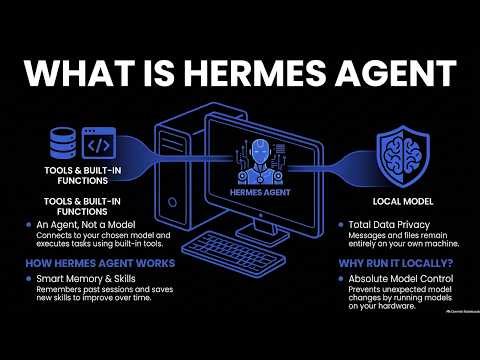
Remember last episode: a model answers, an agent acts. Hermes is the agent part. It doesn't contain the model. It talks to the model you choose.
That can be a provider like OpenRouter or OpenAI, or a custom endpoint, which is how you point it at a model running on your own machine.
Quick quiz. Is Hermes Agent a model? Comment your answer.
It's B. It's an agent that talks to a model you choose.
An agent is only as useful as its tools. Like a chef with no knives. Hermes comes with dozens of built-in tools, grouped into toolsets, so you can switch on only the groups a job needs.
When it runs commands, you choose where: on your own computer, inside Docker, or over SSH on another machine, among others. Docker or a separate machine keeps its commands away from your own files.
And it supports MCP, so you can connect outside tools, the same standard plug we use with Claude in this channel.
Next, memory. Hermes keeps notes it updates over time, so it remembers things about your work between sessions, instead of starting from nothing each time you talk to it.
It can also search your past sessions, so something you solved last week isn't lost.
And this is the self-improving part. After a complex task, it can write a skill, a saved way of doing that task, and improve it each time it's used.
If you want to see Hermes running for real, subscribe. Later in this series, we set it up step by step.
You can talk to Hermes in two main ways. The first is the terminal, with its own text interface, where you see each tool it uses as it works. It's the best place to start, because you see everything.
The second is a messaging gateway. The project lists Telegram, Discord, Slack, WhatsApp and Signal, so your agent can answer you in a chat app, even from your phone.
Pause the video and open the Hermes Agent page on GitHub, linked below.
Find the list of chat apps it supports. Resume when you've found it.
So why point Hermes at a model you run yourself? Privacy first. Your messages and files go to your own machine, not to a provider.
Control second. You choose the model, and nobody changes it under you. If you like how it answers today, it answers the same way next month.
But the trade-off is real. You need a machine strong enough for the model, and you look after it. That's what the next episodes are about.
Last quiz. How does Hermes reach a model on your own machine? Comment.
B, a custom endpoint. You point it at the model you're running.
Recap. Hermes Agent is an open-source agent from Nous Research, not a model.
It has tools, supports MCP, keeps memory and writes its own skills.
You talk to it in the terminal, or in a chat app.
And it can use a model you run yourself. Next time: installing Hermes Agent and giving it its first tool.