Go deeper
An agent you build and run yourself, which picks from a closed list of actions and asks before it acts. Needs some Python.

Course
Build an AI agent for your business that picks actions from a closed list you define, waits for your approval on anything you haven't cleared to run alone, and refuses five kinds of action in code: moving money, DNS, deleting, revoking keys and changing itself.
- Level
- Builder: Python
- Format
- Video lessons, PDF, Files (zip)
- You need
- Some Python, or the patience to learn it with Claude beside you
Next lesson
Run Hermes Agent on DGX Spark with vLLM (Following NVIDIA's Playbook)
All lessons in Local AI: Hermes Agent on NVIDIA DGX Spark
Lesson script
The lesson's script, line by line. The published video's own lines are not on record here, so the video may differ in places.
First, what is it? The DGX Spark is a small desktop computer from NVIDIA, made for AI work.
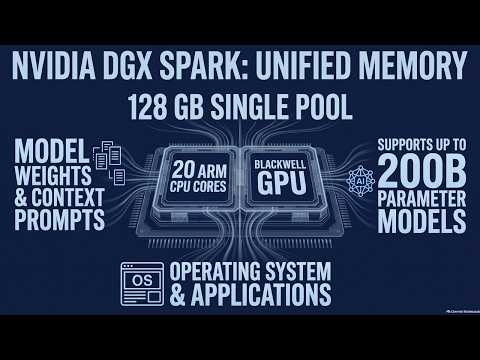
Inside is the GB10 Grace Blackwell Superchip: twenty Arm CPU cores and a Blackwell GPU, integrated together.
It runs NVIDIA's DGX OS. NVIDIA rates it at up to one petaflop of AI performance, at FP4 precision.
In a usual PC, the CPU has its memory, and the graphics card has its own, separate. A model must fit in the GPU's part.
The Spark has one pool instead: one hundred and twenty eight gigabytes of LPDDR5x, coherent, unified system memory.
NVIDIA's own troubleshooting puts it simply: the GPU and CPU share memory dynamically. Each takes what it needs, from the same pool.
Quick quiz. On the DGX Spark, who uses that memory: the GPU, the CPU, or both? Comment your answer.
B, both. It's one pool, and they share it as they go.
So where does it all go? First, the model's weights: the file that does the thinking has to sit in memory.
Second, the context. NVIDIA's vLLM troubleshooting lists out of memory as context length too large, or model too big. Long prompts cost memory too.
And third, everything else: the operating system and your apps live in that same pool. So not all of it is there for weights.
If you're curious about running AI on your own hardware, subscribe.
NVIDIA says the Spark supports AI models up to two hundred billion parameters. Notice the words up to.
That's a ceiling for the model, not a promise for every setup you could build.
A long context, many chats at once, or other apps running all change how much room is left. Which is why we never guess.
Pause the video and pick one thing you'd like to run on a machine like this.
Then list what else would share that memory while it runs. Resume when you have your list.
Two things surprise people. Run nvidia-smi, and memory usage says not supported. That's expected: there's no separate GPU memory to report.
And if memory looks tight while you're well within capacity, NVIDIA documents flushing the buffer cache, for debugging, then restarting your app. It's a known quirk, not a broken machine.
So how do you know what works? NVIDIA publishes playbooks for the Spark, at build.nvidia.com slash spark.
There are playbooks for vLLM, llama.cpp, TensorRT-LLM, NIM, and even Hermes Agent. We'll follow them, step by step, later in this series.
And if you hit out of memory, NVIDIA's fix is a shorter max context, fewer chats at once, or a lower memory share for the server.
Last quiz. A model is under two hundred billion parameters. Is it guaranteed to run well? Comment.
B. Check NVIDIA's playbook. Context, other apps and settings all use the same pool.
Recap. The GB10 puts the CPU and the GPU together.
They share one coherent pool of memory, dynamically.
Model weights, the context and the system all live in that pool.
So the real question is what fills the pool. And for that, check NVIDIA's playbooks, never a guess. Next time: running Hermes Agent on a DGX Spark with vLLM.